Best Desk Accessories for Productivity (2026)
Compare the best desk accessories for a productive home office in 2026: monitor light bars, laptop stands, and desk organizers. Practical picks with clear use cases.
In this guide
Affiliate Disclosure:
As an Amazon Associate I earn from qualifying purchases. Product images shown may be representative lifestyle photos unless official product images are available through an approved Amazon data source. We do not display live prices, ratings, or availability — check Amazon for current details.
In this guide
Who this guide is for
This guide is for remote workers and home office users who want to improve a specific aspect of their desk setup: lighting for evening or windowless work, screen height when using a laptop at a desk, or surface organization when a workspace has accumulated clutter. It covers three focused categories — monitor lights, laptop stands, and desk organizers — rather than a broad list of every desk gadget available.
If you are building a home office from scratch and need a chair or desk first, see our guides on office chairs and standing desks.
How we chose
We selected accessories that solve a specific problem clearly, fit a home office context, and are available on Amazon with verifiable product specifications. We prioritized products where the feature set is well-documented: USB power source, adjustable brightness levels and color temperature (monitor lights), height range and laptop compatibility (stands), and compartment dimensions (organizers). Products were selected based on publicly available specifications — we did not test units in person for this guide.
5 things to know before buying desk accessories
Monitor light bars need a compatible bezel. Light bars clip to the top edge of a monitor. They require a flat top bezel of at least a few millimeters. Very thin-bezel monitors or curved screens may not be compatible. Check the product’s mount compatibility specifications before ordering.
Laptop stands work best with an external keyboard. If the stand raises the laptop significantly, the built-in keyboard ends up too high for comfortable typing. Pair a laptop stand with an external keyboard and mouse to get both screen height and wrist position right.
Color temperature matters for monitor lights. A range from warm (around 2700K) to cool (around 6500K) lets you adjust the light to match the time of day and ambient lighting. Warm light suits evening work; cooler light is easier on the eyes for daytime screen sessions. Look for models with an adjustable color temperature range.
Desk organizer dimensions are more important than style. Measure the desk area where the organizer will sit before buying. A tall organizer with a 13-inch depth on a 24-inch deep desk takes up over half the depth — confirm dimensions match your available workspace.
USB-A vs. USB-C power source. Most monitor light bars still use USB-A. If your monitor or laptop dock only has USB-C ports, verify the cable type or factor in an adapter. Some newer monitor light models ship with USB-C — check the product listing carefully.
Desk accessories comparison
Product | Model & variant | Choosing |
|---|---|---|
BenQ ScreenBar monitor light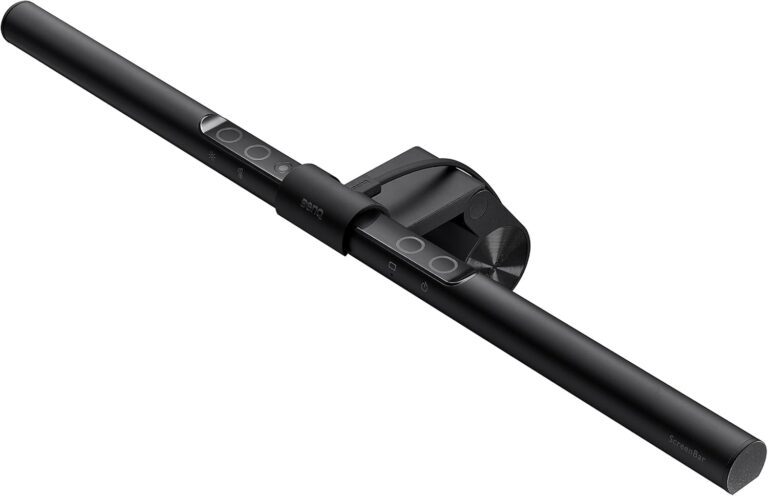 | ScreenBar Black / ScreenBar / USB | Check the monitor's thickness and top-edge shape before choosing a clamp-mounted light. Allow space for a webcam and confirm the power connection; monitor mounting frees desk space but depends on screen compatibility. |
Simple Houseware mesh desk organizer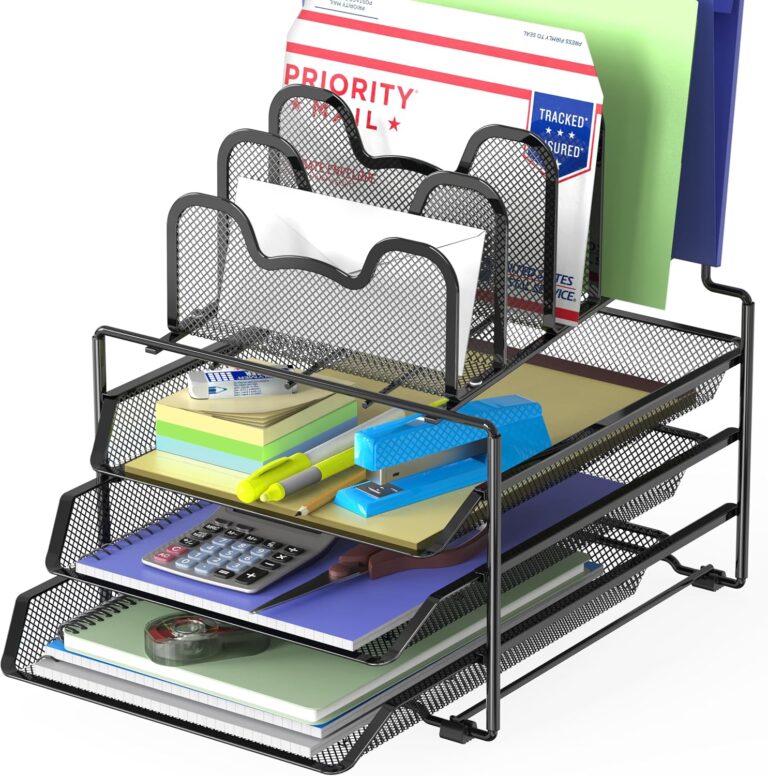 Objects shown to illustrate use are not a statement of included accessories; see the model and variant details. | DO-011-1 Black / three trays / five sections | Measure the footprint with a tray pulled out and check your paper sizes. Open mesh storage makes contents accessible, but it does not protect documents from dust or spills. |
Nulaxy C5 adjustable laptop stand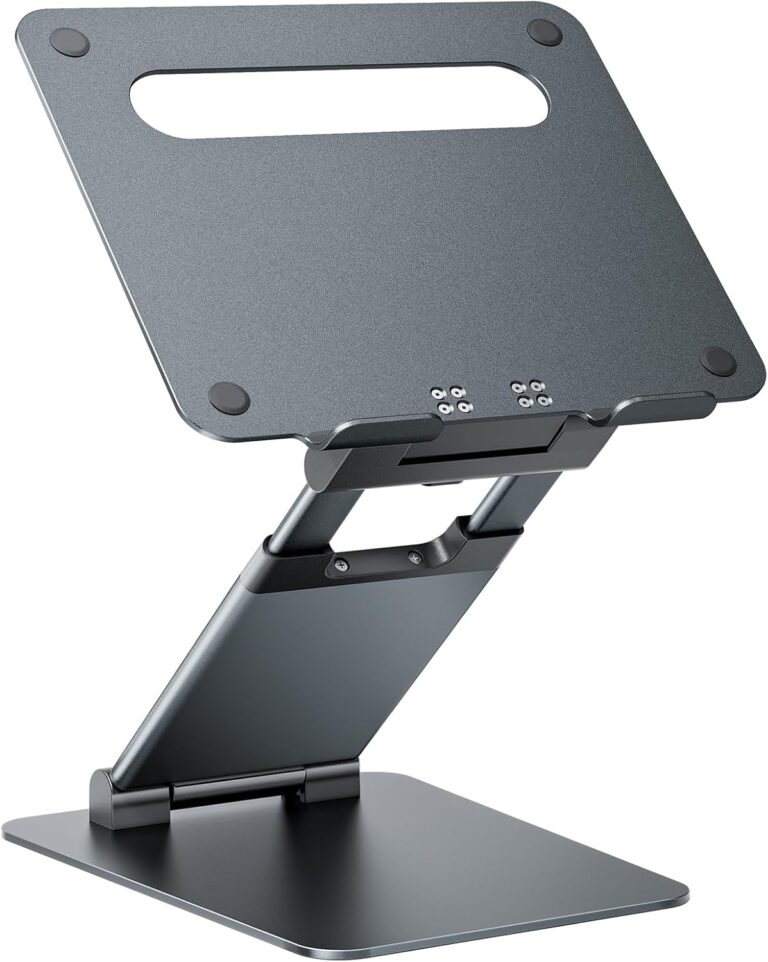 | C5 Aluminum / height-adjustable | Check stability with your laptop at the height you intend to use. Plan a separate keyboard for a raised screen and confirm the stand's folded size if you will carry it. |
Our top picks
BenQ ScreenBar monitor light
A USB-powered light bar that mounts above a monitor, with adjustable brightness and color temperature. This is the original black ScreenBar, not a Halo or Pro package.
Variant: Black / ScreenBar / USB
Check the monitor's thickness and top-edge shape before choosing a clamp-mounted light. Allow space for a webcam and confirm the power connection; monitor mounting frees desk space but depends on screen compatibility.
View product details →View on AmazonNulaxy C5 adjustable laptop stand
An aluminum laptop riser with a folding, height-adjustable support. The C5 offers positioning flexibility compared with the fixed-angle C3 format.
Variant: Aluminum / height-adjustable
Check stability with your laptop at the height you intend to use. Plan a separate keyboard for a raised screen and confirm the stand's folded size if you will carry it.
View product details →View on AmazonObjects shown to illustrate use are not a statement of included accessories; see the model and variant details.
Simple Houseware mesh desk organizer
A black mesh desk organizer with three sliding trays and five upright sections. It separates loose papers from folders without enclosing them in drawers.
Variant: Black / three trays / five sections
Measure the footprint with a tray pulled out and check your paper sizes. Open mesh storage makes contents accessible, but it does not protect documents from dust or spills.
View product details →View on AmazonBuyer's guide: what to look for in desk accessories
Monitor light bars
The main advantages of a monitor light bar over a desk lamp are: it mounts on the monitor and takes up no desk surface, and it is angled to avoid reflecting in the screen panel. The key specs to check are the brightness range, color temperature range, and power source. A wider color temperature range (2700K–6500K) gives you flexibility across warm and cool lighting conditions. USB-A power is standard on most models — verify port availability on your monitor or hub before ordering.
Laptop stands
A laptop stand raises the screen toward eye level, which is more comfortable for extended desk sessions than looking down at a low laptop screen. The practical use case requires pairing it with an external keyboard and mouse — raising the laptop makes the built-in keyboard inaccessible for comfortable typing. Look for stands with a wide height range (a range of 15+ inches is useful), stability at the highest settings, and a folding design for storage when not in use.
Desk organizers
Desk organizers work best when matched to the specific items on your desk. Before buying, list what you need to store: pens and pencils, notebooks, loose papers, mail, chargers, or a combination. A multi-section organizer with both vertical upright compartments and horizontal tray drawers handles most working desk mixes. Check the physical dimensions carefully: both the footprint on the desk and the height against any shelving above the workspace.
Accessory pairing
Many desk accessories work better in combination. A laptop stand plus an external keyboard and mouse creates a proper workstation from a laptop. A monitor light bar plus a desk organizer reduces the two most common desk friction points — inadequate lighting and surface clutter — without requiring additional furniture. Start with the specific friction point that affects your current setup and add from there.
Frequently asked questions
What is a monitor light bar and how is it different from a desk lamp?
A monitor light bar mounts on the top edge of a monitor and directs light downward onto the desk surface. Unlike a desk lamp, it is positioned to avoid reflecting in the screen. The result is an illuminated desk area without glare on the monitor panel. Monitor light bars are USB-powered and take up no desk surface space.
Do I need an external keyboard if I use a laptop stand?
Yes — if the laptop is raised significantly on a stand, the built-in keyboard is no longer at a comfortable typing height. Pairing a laptop stand with an external keyboard and mouse is the standard setup. The stand positions the screen at a better viewing height while the external keyboard keeps wrists in a neutral position.
What should I look for in a desk organizer?
The most important factor is whether the organizer holds the things you actually use. Consider the sections: vertical compartments for pens, scissors, and notebooks; horizontal trays for papers, mail, and documents. Also check the footprint (width and depth) against your available desk space. Mesh designs allow visibility so items are easier to locate.
Can a monitor light bar work with any monitor?
Most monitor light bars clip onto the top bezel of a monitor. They work with most standard monitors that have a flat top edge and a bezel of at least a few millimeters. Very thin bezel monitors or curved monitors may not be compatible — check the product’s compatibility notes before ordering.
Are desk accessories worth it for a home office?
Desk accessories address specific friction points. A monitor light reduces the need for an overhead light during screen work. A laptop stand raises the screen to eye level when using external peripherals. A desk organizer reduces surface clutter. Each solves a narrow, practical problem. Whether they are worth it depends on whether those specific problems apply to your setup.